Difference between revisions of "KVM-A4"
| (6 intermediate revisions by 2 users not shown) | |||
| Line 66: | Line 66: | ||
X630+X630-A4+X630-A5+0.96OLED+Ethernet.jpg|KVM-A4 V1.1 Packing List | X630+X630-A4+X630-A5+0.96OLED+Ethernet.jpg|KVM-A4 V1.1 Packing List | ||
</gallery> | </gallery> | ||
| + | |||
| + | ==Matching Casse== | ||
| + | We do not provide an official case. If you want a matching case, you can refer to [https://www.printables.com/model/713258-geekworm-pikvm-a4-case here] and then 3D print one yourself. | ||
==Installation Guide== | ==Installation Guide== | ||
| Line 110: | Line 113: | ||
1. Firstly, need prepair a micro sd card, a minimum 16 Gb class 10 memory card is recommended. | 1. Firstly, need prepair a micro sd card, a minimum 16 Gb class 10 memory card is recommended. | ||
| − | 2. Download an appropriate OS image for the PiKVM, the url link is: https://pikvm.org/ | + | 2. Download an appropriate OS image for the PiKVM, the url link is: https://docs.pikvm.org/flashing_os/, Please download the image for Raspberry Pi Zero 2 W. |
| + | |||
| + | [[File:PiKVM V2 Platform.png|800px]] | ||
| + | |||
| + | <!-- | ||
| + | Or download the image through the following path: the url link is: https://files.pikvm.org/images/ | ||
| + | |||
| + | ①Index of /images/ | ||
| + | |||
| + | ②Index of /images/v2-hdmi-zero2w/ | ||
| + | |||
| + | ③Index of /images/v2-hdmi-zero2w/arm/ | ||
| − | + | Download the latest version | |
| + | [[File:V2-hdmi-zero2w.png|800px]] | ||
| + | --> | ||
'''!!! warning''' "ZeroW reached EOL and is no longer supported | '''!!! warning''' "ZeroW reached EOL and is no longer supported | ||
Latest revision as of 18:04, 22 August 2025


Contents
Update History
In August 2023, the X630-A4 has been updated from V1.1 to V2.0 version, the PCB layout and PCB size of X630-A4 has changed a lot.

Overview
PiKVM-A4 is one of the members of PiKVM[1] family, it only supports Raspberry Pi Zero 2 W without a matching metal case.
!!! warning "ZeroW reached EOL and is no longer supported, the last image it can be found here"
Or you can refer to here
The PiKVM-A4 is composed of follow parts:
- X630 HDMI to CSI-2 Board (for video capture)
- X630-A4 HAT Board (for ethernet, RTC, ATX Control power in etc)
- X630-A5 Adapter Board (it is installed inside the PC case, and it connect the computer motherboard and IO panel cabe of PC case))
- 0.96 inch OLED (for display, Resolution: 128×64 pixel)
- Ethernet Cable (TIA/EIA-568.B connection, and it's ATX control signal cable)
How to Power
- (For X630-A4 V2.0) Power Input: 5.1Vdc +/-5% , ≥3A (Power Via Micro-USB port of Raspberry Pi Zero 2W)
- (For X630-A4 V1.1) Power Input: 5.1Vdc +/-5% , ≥3A (Power Via USB Type-C port of X630-A4 V1.1)
How to Cool
- The new version KVM-A4 V2.0 (X630-A4 V2.0) does not support C296 aluminum heatsink installation, please use the ordinary heatsink for the CPU of Raspberry Pi Zero 2 W.
- For use with raspberry pi zero 2 w, X630-A4 V1.1 (KVM-A4) allows to use C296 aluminum heatsink with your Raspberry Pi Zero 2 W, but user need to prepare 4pcs M2.5*7mm screws yourself.
Geekworm KVM family products:
| Model | Compatible With | Form Factor | Max Input Resolution | ATX Control | RTC Chipset | OLED display | PoE | RS232 Console | Ethernet | M.2 NVMe Socket | Control of PCs | USB HUB | I2S audio |
|---|---|---|---|---|---|---|---|---|---|---|---|---|---|
| KVM-A3 V1.6 | Raspberry Pi 4 | HAT | 1920x1080 @50Hz | Yes | DS1307 | 0.96" | No | No | 1GbE | No | 1 | No | Yes In-phase I2S wire |
| KVM-A8 V1.8 | Raspberry Pi 4 | PCI | 1920x1080 @50Hz | Yes | PCF8563 | 0.96" (Equipped with a 2P wire to connect the OLED) |
802.3af | No | 1GbE | No | 1 | No | Yes Inverted-phase I2S wire |
| KVM-A4 V2.0 | Raspberry Pi 2W | HAT | 1920x1080 @50Hz | Yes | DS1307 | 0.96" | No | No | No | No | 1 | No | No |
| X680 V1.5 | Raspberry Pi CM4 | Box | 1920x1080 @60Hz | Yes | PCF8563 | 0.96" | No | No | 1GbE | 2280 | 4 | Yes | No |
Updated to V1.5 now |
Raspberry Pi CM4 | Box | 1920x1080 @50Hz | Yes | DS1307 | 0.96" | No | No | 1GbE | 2280 | 4 | Yes | No |
| X651 V1.0 | Raspberry Pi CM4 | PCI | 1920x1080 @60Hz | Yes | DS1307 | 0.96" | 802.3af | No | 1GbE | No | 1 | No | No |
| Raspberry Pi CM4 | PCI | 1920x1080 @50Hz | Yes | DS1307 | No | No | No | 1GbE | No | 1 | No | No | |
| Raspberry Pi CM4 | PCI | 1920x1080 @60Hz | Yes | DS1307 | No | No | No | 1GbE | No | 1 | No | No | |
| Raspberry Pi CM4 | PCI | 1920x1080 @60Hz | Yes | DS1307 | No | 802.3af (POE injector is required due to compatibility issues) |
No | 1GbE | 2280 | 1 | No | No |
Packing List
- 1 x 0.96 inch OLED: Resolution: 128×64 pixel, with 2 piece of M2*6 screws
- 1 x Ethernet Cable (Cable length: 100cm)
- 1 x X630 HDMI to CSI-2 Module
- 1 x FPC Cable(8cm length)
- 1 x X630-A4 V1.1 Expansion Board
- 1 x USB-A to USB-C OTG Cable (Cable Length: 100cm / 39.37 inch)
- 8 x M2.5x3mm Screw
- 3 x M2.5x4+4mm Spacers
- 1 x M2.5x10+4mm Spacer
- 1 x M2.5x15+4mm Spacer
- 2 x M2.5x15mm F/F Spacers
- 1 x X630-A4 V2.0 Expansion Board
- 1 x USB-A to Micro USB OTG Cable (Cable Length: 100cm / 39.37 inch)
- 2 x M2.5x4+4mm Spacers
- 2 x M2.5x17mm F/F Spacers
- 1 x M2.5x9mm F/F Spacer
- 1 x M2.5x15mm F/F Spacer
- 8 x M2.5x4mm Screws
- 1 x X630-A5 V1.0 Adapter Board
- 1 x M3.5x6mm Screw
- 4 x ATX Control Cable(2pin Female to Female Dupont Cables) (Cable Length: 47cm / 18.50 inch)
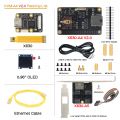
KVM-A4 V2.0 Packing List
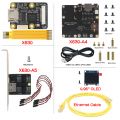
KVM-A4 V1.1 Packing List


Matching Casse
We do not provide an official case. If you want a matching case, you can refer to here and then 3D print one yourself.
Installation Guide
Hardware Parameters
for KVM-A4 V2.0, (Click the following picture to zoom out)


Hardware Installation
For X630-A4 V2.0:

For X630-A4 V1.1:Sold OUT

For X630-A4 V2.0:

For X630-A4 V1.1: (Sold OUT)

Note:
- The X630-A5 adapter board will be install into the PC Case.
- The wire group ① connect to X630-A5 comes from the PANEL of PC Case.
- The black and red wires(wire group ②) come from X630-A5 accessories.
Installation Video
New Version KVM-A4 V2.0: https://youtu.be/RUY6J6LVDhY
Old Version KVM-A4 Kit: https://youtu.be/a2oYTEh7QC0
OS Download & Installation
1. Firstly, need prepair a micro sd card, a minimum 16 Gb class 10 memory card is recommended.
2. Download an appropriate OS image for the PiKVM, the url link is: https://docs.pikvm.org/flashing_os/, Please download the image for Raspberry Pi Zero 2 W.

!!! warning "ZeroW reached EOL and is no longer supported
3. Flash it to a microSD memory card by following the simple instructions or Official installation tutorial
4. Power the device, then open explore to login the pikvm web ui.
5. Blog sharing for reference: https://www.andysblog.de/kvm-over-ip-pikvm-als-bausatz
Firstly, we recommend carefully reading official documentation from website: https://docs.pikvm.org/faq/.
If you run into any issues you can check the following Q&A. If that still doesn't help you you're welcome to raise an issue ticket at https://geekworm.com/community/forum/topic/78220/pikvm-faq or email to us (support@geekworm.com)
(Please be sure to provide installation pictures or videos to contact us, which can effectively solve the problem.Thanks.)
Enable OLED display
Please refer to: Enable oled on Geekworm PiKVM-A4 Kit
References
- ↑ PiKVM © belongs to https://pikvm.org
FAQ
PiKVM is first and foremost a trademark, which is controlled by https://pikvm.org, and it does not belong to Geekworm.
PiKVM is Free and Open Source Software released under the GPLv3.
Geekworm's KVM products use the open source pikvm software developed by pikvm.org under the GPLv3 without any modification. Geekworm will regularly donate to pikvm.org
About after-sales service of Geekworm KVM Products:
The after-sales service of all products sold by Geekworm should be the responsibility of our Geekworm team (email: support@geekworm.com), please DO NOT disturb the official PiKVM support team.
- First of all, we recommend you to get more FAQ information on the official website: official FAQ, or check the following FAQ;
- You can post a issue ticket at Geekworm forum or email to us (support@geekworm.com) and attached your installation pictures or videos to get some help.
- Blog sharing for reference: https://www.andysblog.de/kvm-over-ip-pikvm-als-bausatz
A:
- First refer to the Video problems to troubleshoot
- Please check the hardware connection. Double-check that the video capture device is connected correctly and tightly.
- Make sure you use the original HDMI port. If your desktop only has a VGA display port, there may be no video signal when you use VGA to HDMI adapter, and there is no way to solve this; However, you can try to lower the resolution and restart the PC to test, but the probability of success is very low.
- Change the HDMI cable to test.
- Test the X630 separately to check if there is HDMI output.(run the
ls /dev/video0command, if you see anything such as /dev/video0 other than file not found, then it’s available ) - Some laptops do not output any signal until you switch the output (usually via the FN + and an F5 key on the keyboard).
- Your computer maybe enter sleep mode, please exit sleep mode.
- Feedback from users: If you're using something like NGINX Proxy Manager, you must have Websockets Support enabled for it to work correctly – screenshots below:

- Feedback from users: Multiple Network IPs. if you'll have similar thing in the future: janus is using stun servers for determining public ip address, if the network has several public IP addresses and route traffic through multiple of those, janus via stun will detect the change of the network and restart the stream each time
- Solution: either lock traffic from pikvm through one gateway (one public IP address) or configure some sort of session persistence (sticky connection)
- Run the command
systemctl status kvmd-tc358743to check whether the video service is working properly.
Q: Why OLED is not display?
A: Please follow the steps below to check
1. Please confirm that the OS is correct according to your Raspberry Pi version:
Due to downloading the wrong firmware, the OLED cannot be displayed. We ALSO made such mistakes during testing
- For Raspberry Pi 4 : https://pikvm.org/download/

- For Raspberry Pi Zero 2 W : https://docs.pikvm.org/flashing_os/
2. Please check if the order of OLED screen pins is correct, please email to support@geekworm.com if it's a wrong pin order;

The run the following command to check the I2C address
sudo i2cdetect -y 1
     0  1  2  3  4  5  6  7  8  9  a  b  c  d  e  f
00:                         -- -- -- -- -- -- -- --
10: -- -- -- -- -- -- -- -- -- -- -- -- -- -- -- --
20: -- -- -- -- -- -- -- -- -- -- -- -- -- -- -- --
30: -- -- -- -- -- -- -- -- -- -- -- -- 3c -- -- --
40: -- -- -- -- -- -- -- -- -- -- -- -- -- -- -- --
50: -- -- -- -- -- -- -- -- -- -- -- -- -- -- -- --
60: -- -- -- -- -- -- -- -- -- -- -- -- -- -- -- --
70: -- -- -- -- -- -- -- --
3c is a hexadecimal number, it is the I2C address of OLED, if you can’t find this value, please shut down and reconnect shield and OLED, then run this command again, If you still can't find the OLED's I2C address, the OLED screen may be damaged.
PS: Since the i2cdetect tool is not installed by default in pikvm os, you need to install it first. You can install it through the following command
pikvm-update
rw
pacman -S i2c-tools -y
4. Then run the following command to enable OLED display:
rw
systemctl enable --now kvmd-oled
ro
5. Please refer to https://geekworm.com/community/forum/topic/200314/kvm-a3-096-oled-display-is-dead if you can't solve the question.
Q: How can I access the device from an external network?
A:Please refer to the official tutorial : https://docs.pikvm.org/v3/

Q: How do I emulate various USB devices on the target machine?

More details, pls refer to: https://discord.com/channels/580094191938437144/896216359963332628/1021503994436276245
Q: How to login pikvm os?
A: Input the XX.XX.XX.XX ip address on the explorer, then input user: admin, the default password is 'admin' also.
Or refer to GETTING TO KNOW THE INTERFACE
Q: How to connect to wifi?
A: Refer to | Optional setting up Wi-Fi
If you want to connect KVM to a Wi-Fi network, you need to tell the device ESSID and password before first boot. To do this, mount the first partition of the memory card (FAT32) and edit or make the pikvm.txt file there. Do not remove line FIRSTBOOT=1 or FIRST_BOOT-1 for first time booting, just add your wifi settings like this:
FIRSTBOOT=1
WIFI_ESSID='mynet'
WIFI_PASSWD='your password'
There is a possibility that, in countries that support CH13, the device will not connect. You will need to configure your router to disable channels 12-14 or disable Auto scan mode so it will connect.
Save, unmount and follow the next step.
Q: How to switch root user?
A:
su root
#default password  is root also
Q: Which pins are available on the KVM-A3?
A: You only can use GPIO16, 26, 11, 17, 25, 9, 10 pins on KVM-A3
A. No, one kit can only control one pc, you can refer to X680 to control up to 4 PCs.
Q: How to enable oled display on KVM-A4?
Q: Will there will be a case for KVM-A4?
Q: How to do if KVM-A8 hangs up or reboot or has to be started manually?
A. The KVM-A8 hardware itself does not cause the system to reboot, and [[KVM-A8 shield is controled by raspberry pi 4;
Please ensure these keys:
1. The PiKVM OS version is correct;
2. Check & use a high-quality power supply;
3. Whether the raspberry pi 4 temperature is too high;
4. Contact us via email to support@geekworm.com

If you find that the color wiring is wrong, please contact us at support@geekworm.com
Q: I want to control several pc power. Is it possible with one KVM-A8
A: No, one PiKVM-A8 can only control one pc. Please refer to X680 4-port IP KVM Switch.
Q: Does KVM-A8 support passive heatsink such as (P165-A or P165-B etc) instead of fan?
A: You can use the P165 aluminium heatsink or the H402 pure copper heatsink, but must remove the X630-A8 fan and fan connector.
①If use P165-A(thickness 7mm), you can use M2.5*5mm spacer instead of M2.5*12mm spacer to fix it;
②if use P165-B(thickness 11mm), you can directly use M2.5*6mm screws to fix it;
③if use H402(thickness 4mm), you can use M2.5*8mm spacer instead of M2.5*12mm spacer.
You can also use other suitable spacers + screws to fix the heatsink.

Q: Why is the X680 not working?
A:
1. Firstly, must make sure the hardware expecially CM4 is connected correctly and securely.
- Check if the X680's onboard SYS-PWR, CM-PWR, CM-ACT LEDs are lit.
- If SYS-PWR LED is not lit, that means no power to X680; If the CM-PWR and CM-ACT LEDs are not lit, that means that the CM4 is not installed properly. Please recheck the CM4 installation, or check if the CM4 / X680 installation slot is damaged.(This is important! Many problems are caused by poor contact of CM4)
- If the X680's SYS-PWR, CM-PWR, CM-ACT LEDs are lit, then check the wiring connection.
Please refer to the following picture for the wiring connection and LED description.


2. Make sure to use the right pikvm OS. Only PiKVM V3 is supported.
V3 Pre-Assembled version already includes OLED display configuration, while V3 HAT Kit version need to configuring OLED yourself.
3. Important: Remove the USB cable after programming is complete.
4. Please email us at support@geekworm.com if you have further questions.
Q: Why is USB mass driver not recognized on X680?
A: Please refer to the description in the red rectangle in the picture below;

The USB mass is not recognized in PIKVM OS, you can understand USB mass as a local USB HUB in PIKVM OS.
These 3 USB ports are used for local switching between target PC1-PC4, e.g. a USB disk with the OS image can be used to install the os in PC1, if switching to PC2, then the os can be installed in PC2, and so on.
Q: Does the X680 support audio?
Q: Does the X680 support PoE power? How to enable PoE Power?
A: The X680 doesn't support POE, but you can use something similar to the PD3005G-3A
Q: Why can't I switch to another PC on X680?
A: You need to make sure that your target computer is not in sleep, because when the computer is sleep, the USB port will stop supplying power
Q: Why NVME SSD cannot be recognized on X680?
A: Login the pikvm web teminal, then type the following command:
lspci
The result of the command should look similar to the following, if you can't find something similar to the following, your NVME SSD is not compatible
Q: How to boot from NVMe SSD on X680?
A: Refer to the following third-party tutorials:
- https://www.jeffgeerling.com/blog/2021/raspberry-pi-can-boot-nvme-ssds-now
- https://hagensieker.com/2022/04/17/booting- a-raspberry-pi-cm4-from-an-nvme/
- https://dphacks.com/2021/11/21/how-to-boot-a-pi-cm4-from-nvme-ssd/
You can also check out the official guide of the Raspberry Pi Foundation on how to boot CM4 from NVMe devices
Q: Can PiKVM work on Raspberry Pi 5?
A: Not yet, but it will in the future. The Raspberry Pi 5 does not support hardware video encoding, it's not recommended for PiKVM right now.
<comments />
Enable comment auto-refresher