-
X1200: Difference between revisions
Replace <comments/> with <comment-streams /> |
|||
| (11 intermediate revisions by 3 users not shown) | |||
| Line 5: | Line 5: | ||
[[File:X1200-V1.2-IMG-7239.jpg|thumb|right|X1200 V1.2]] | [[File:X1200-V1.2-IMG-7239.jpg|thumb|right|X1200 V1.2]] | ||
[[File:X1200-V1.2-IMG-7220.jpg|thumb|right|X1200 V1.2 with Raspberry Pi 5]] | [[File:X1200-V1.2-IMG-7220.jpg|thumb|right|X1200 V1.2 with Raspberry Pi 5]] | ||
[[File:X1200-V1.2-IMG-7239-BAT.jpg|thumb|right|X1200 Raspberry Pi 5 UPS-Battery Requirement]] | |||
[[File:X1200-V1.2-IMG-7222.jpg|thumb|right|X1200 V1.2 with Raspberry Pi 5]] | [[File:X1200-V1.2-IMG-7222.jpg|thumb|right|X1200 V1.2 with Raspberry Pi 5]] | ||
[[File:X1200-V1.2-IMG-7228.jpg|thumb|right|X1200 V1.2 with Raspberry Pi 5 & Active Cooler]] | [[File:X1200-V1.2-IMG-7228.jpg|thumb|right|X1200 V1.2 with Raspberry Pi 5 & Active Cooler]] | ||
| Line 108: | Line 109: | ||
* CM2.5 x 4 screws x 4 | * CM2.5 x 4 screws x 4 | ||
[[File:X1200-V1.2-IMG-7239-packing-list.jpg | 600px]] | [[File:X1200-V1.2-IMG-7239-packing-list.jpg | 600px]] | ||
==Script Reference== | |||
{{X120x Series UPS Script Reference}} | |||
==User Manual== | ==User Manual== | ||
* Dimensions source file (DXF): [[File:X1200-pcb-v1.dxf]] - You can view it with [https://viewer.autodesk.com/ Autodesk Viewer] online | * Dimensions source file (DXF): [[File:X1200-pcb-v1.dxf]] - You can view it with [https://viewer.autodesk.com/ Autodesk Viewer] online | ||
* X1200 Hardware: [[X1200 Hardware]] | * X1200 Hardware: [[X1200 Hardware]] | ||
* How to get x1200 work: [ | * How to get x1200 work: [[#Script Reference]] | ||
* Low voltage warning solution for X120x Series UPS: | * Low voltage warning solution for X120x Series UPS: | ||
[[File:IMG-7278-Low-Voltage.jpg | 700px]] | [[File:IMG-7278-Low-Voltage.jpg | 700px]] | ||
| Line 125: | Line 129: | ||
* Case dimensions: 90.8 x 69 x 62.8 mm / 3.57 x 2.72 x 2.47 inches | * Case dimensions: 90.8 x 69 x 62.8 mm / 3.57 x 2.72 x 2.47 inches | ||
* Note: On 12 March 2025, we updated the X1200-C1 case to '''add a row of cooling holes''' on the TF card slot side to '''increase airflow and take more advantage of the Raspberry Pi 5 active heatsink'''. | * Note: On 12 March 2025, we updated the X1200-C1 case to '''add a row of cooling holes''' on the TF card slot side to '''increase airflow and take more advantage of the Raspberry Pi 5 active heatsink'''. | ||
*Note: If you only need to use the X1200-C1 with the Raspberry Pi 5 motherboard (without the X1200 UPS board), you can separately add 4 M2.5*6+5 screws (or directly use M2.5*27 copper standoffs) to achieve the ideal installation. | |||
<gallery> | <gallery> | ||
X1200-C1-IMG-8145-Packing-List.jpg | X1200-C1 Accessories | X1200-C1-IMG-8145-Packing-List.jpg | X1200-C1 Accessories | ||
| Line 132: | Line 136: | ||
004-X1200-C1-IMG-8137-Interface.jpg |Interface-Rear | 004-X1200-C1-IMG-8137-Interface.jpg |Interface-Rear | ||
005-X1200-C1-IMG-8140-size.jpg|X1200-C1 Dimension | 005-X1200-C1-IMG-8140-size.jpg|X1200-C1 Dimension | ||
</gallery> | </gallery> | ||
| Line 138: | Line 143: | ||
<!--Add review function! --> | <!--Add review function! --> | ||
< | <comment-streams id="main" /> | ||
<!--Please choose the --> | <!--Please choose the --> | ||
Latest revision as of 10:13, 27 May 2026


Safety Instructions & Warnings
- The power adapter must with overvoltage and surge voltage protection; otherwise, it may easily damage the circuit board. Damage caused by a substandard power supply will not be covered under warranty.
- It is essential to read and understand these safety instructions and warnings before charging your batteries.
- Lithium Polymer and Li-ion batteries are volatile. Failure to read and follow the instructions below may result in fire, personal injury, and damage to property if charged or used improperly.
- Never make a wrong polarity connection when charging or discharging battery packs. Always double-check the polarity of the battery's connector to ensure that "+" is connected to "+" and "-" is connected to "-".
- Do not mix and use old batteries with new batteries, or batteries with different brand names.
- Lithium batteries have a limited cycle life. Please replace old batteries with new ones when they reach their service life or when they are two years old, whichever comes first.
- When charging the Battery Pack, please place the battery in a fireproof container. Do not leave the UPS shield on wood material or carpet unattended.
- Keep the UPS shield away from children to ensure their safety.
- Ensure your fingers do not touch the solder pads when inserting the battery into the battery holder, as this could cause a short circuit. This is extremely important!!!
- Make sure to insert the battery before turning on the UPS.
- Make sure to insert the battery before connecting the external charger to charge it.
- Please watch Main Video and Tutorial Video regarding 18650 batteries at: https://www.staysafebattery.com/en/
- Battery Recommend for Geekworm UPS board, please refer to: File:NCR18650B.pdf
Overview
X1200 is an innovative uninterruptible power supply (UPS) expansion board designed specifically for the Raspberry Pi 5. With its advanced features and robust power backup capabilities, the X1200 is perfect for even the most demanding Raspberry Pi setups.
Please note: If the UPS does not detect the RPi5, it will automatically shut down within 3 seconds. So you need to install the RPi 5 on the UPS and make sure that the RPi5 has good contact with the UPS's pogo pins.
▼ Expand 📋 Geekworm Raspberry Pi 5 UPS Family:
- *The Matching Case section only indicates compatibility between the case, UPS and Raspberry Pi 5 Board, and excludes products in the Product Matching Reference section. Compatibility of these referenced products with the case is subject to their actual specifications.
- *In addition to voltage and current, ensure that the total power of the power supply meets or exceeds the recommended input power (Total Power = Voltage × Current).
| Model | Compatible with | Mounting Position | Lithium battery type | Battery Holders | Power Input Connector | Power Output Connector | Matching Case | Product Matching Reference | Note |
|---|---|---|---|---|---|---|---|---|---|
| X1200 | Raspberry Pi 5 | Bottom | 3.7V 18650 Battery | 2-Cell |
|
5Vdc Power Output XH2.54-2P x2 | X1200-C1 |
|
- |
| X1201 | Raspberry Pi 5 | Bottom | 3.7V 18650 Battery | 2-Cell |
|
5Vdc Power Output XH2.54-2P x3 | X1201-C1 |
|
Ultra-thin |
| X1202 | Raspberry Pi 5 | Bottom | 3.7V 18650 Battery | 4-Cell |
|
5Vdc Power Output XH2.54-2P x2 | X1202-C1 |
|
- |
| X1203 | Raspberry Pi 5 | Bottom | 3.7V Lithium Battery | No battery holder(recommended to use with X12-A1) |
|
5Vdc Power Output XH2.54-2P x2 | - |
|
- |
| *X1205 | Raspberry Pi 5 | Bottom | 3.7V 21700 Battery | 2-Cell |
|
5Vdc Power Output XH2.54-2P x2 | X1205-C1 |
|
- |
| *X1206 | Raspberry Pi 5 | Bottom | 3.7V 21700 Battery | 4-Cell |
V2.0 Version
V1.1 Version
|
5Vdc Power Output XH2.54-2P x2 | X1206-C1 |
X1206 V2.0 Version: Geekworm 12 V / 5 A Power Adapter / PSU12V10A
|
- |
| *X1207 | Raspberry Pi 5 | Top | 3.7V 21700 Battery | 1-Cell |
|
- | X1207-C1 |
|
Support PoE-Powered |
| *X1208 | Raspberry Pi 5 | Top | 3.7V 21700 Battery | 1-Cell |
|
- | X1207-C1 | - | Support M.2 NVMe SSD 2230/2242/2280 |
| *X1209 | RPi 5B/4B/3B/3B+ | Top | 3.7V Lithium Battery | No battery holder(recommended to use with X12-A1) |
|
5V Power Output XH2.54-2P x2 | - |
|
- |
| *X728 | All RPi that use a 40-pin header | Top | 3.7V 18650 Battery | 2-Cell |
|
5V Power Output
|
- |
|
- |
| *X-UPS1 | All RPi & Most Single Board Computers (SBC) that uses 12Vdc or 5Vdc | Standalone | 3.7V 18650 Battery | 4-Cell |
|
|
- |
|
- |
Reliable Power Backup: The X1200 provides a stable 5.1V 5000mA power backup, ensuring uninterrupted operation of your Raspberry Pi. Whether you are running resource-intensive applications or powering multiple peripherals, the X1200 delivers reliable and consistent power supply.
Enhanced Power Management: One of the standout features of the X1200 is its enhanced power management system. It intelligently monitors the power status of the Raspberry Pi and automatically cuts off power when the Pi is shut down. This helps optimize battery life by entering an ultra-low standby power consumption mode. It ensures efficient operation and maximizes the lifespan of the UPS battery.
Seamless Power Switching: Equipped with AC power loss and power adapter failure detection, the X1200 seamlessly switches to backup power in the event of a power outage or power adapter failure. This feature guarantees that your Raspberry Pi remains operational and protected from unexpected power disruptions.
Convenient Features: The X1200 offers convenient features such as auto power-on, enabling your Raspberry Pi to automatically boot up when power is restored. It also supports full power-off from software, allowing you to safely shut down your Raspberry Pi without manual intervention.
Fast Charging: With fast charging capabilities of up to 3000mA, the X1200 ensures quick recharging of the UPS, making it ready to provide backup power whenever needed.
Versatile Design: The X1200 is designed to be attached on bottom and don't use the 40-pin header, enabling easy stacking with other Raspberry Pi accessory boards. This versatility allows you to expand the functionality of your Raspberry Pi and create enhanced applications tailored to your specific needs.
Seamless Data Backup: The X1200 is compatible with our range of storage products, providing seamless integration for safe and reliable data backup. Your valuable data remains protected, even in the event of a power failure.
Enhance the reliability and performance of your Raspberry Pi 5B with the X1200 UPS expansion board. Experience peace of mind with its advanced features and robust power backup capabilities. Trust the X1200 to ensure uninterrupted operation and safeguard your valuable data.
Features
| For use with |
Raspberry Pi 5 Model B |
| Key Features |
UPS Output
Battery Charging
Power Input
Enhanced Power Management
Miscellaneous
|
| Spec |
Power&Charge input: 5Vdc 5A via USB Type-C of X1200 UPS output: 5.1V ±5% Max 5A Battery charging current: Max 2.3-3.2A Terminal Battery Voltage: 4.23V Battery Recharge Threshold: 4.1V Ports & Connectors:
PCB Size: 85mm x 56mm |
| Notes |
|
Packing List
- X1200 UPS shield x 1
- CM2.5 x 4 screws x 4

Script Reference
This section includes two types of script resources for debugging and adapting X120x series UPS HATs. Official scripts are factory-adapted basic versions, while open-source projects are for extended reference only. All scripts must undergo prototype testing before formal use to avoid compatibility risks.
Note: The content below is a brief summary only. Click the corresponding link for detailed script examples.
Official Scripts (Click Here)
- Edit EEPROM Configuration
- Configure I2C on Raspberry Pi
- Read UPS Status
- Manually Check Battery Voltage & Percentage
- Test AC Power Loss Detection
- Control Battery Charging (For Advanced Users Only)
Third-Party Extension
- We sincerely appreciate the dedication and generous open-source contribution from the community user for these GitHub projects.
- Please note: these are independent third-party resources, not developed, verified, or maintained by our official team. We share these links for reference only; please independently verify its compatibility with your specific device, system environment, and actual needs.
- Extension 1(Click Here)
- This repository hosts a community-developed x120x-dkms kernel driver for Raspberry Pi, designed for X120x series UPS HATs, with tentative experimental compatibility for X728, X729 and X708 models. It enables basic native Linux power supply integration (including simple battery status display, low-power shutdown, and optional battery longevity mode) with no extra custom scripts required.
- Extension 2(Click Here)
- This project supports intelligent automatic shutdown, battery overcharge protection, low-temperature delayed charging, systemd journal logging, JSON UPS status output, network-based real-time UPS status update, system service & manual running modes, battery temperature monitoring and automatic thermal cooling.
User Manual
- Dimensions source file (DXF): File:X1200-pcb-v1.dxf - You can view it with Autodesk Viewer online
- X1200 Hardware: X1200 Hardware
- How to get x1200 work: #Script Reference
- Low voltage warning solution for X120x Series UPS:

- Installation Guide

Installation Video https://youtu.be/sKlRIPLSck0
Matching Case
X1200-C1 is a metal case for Raspberry Pi 5 & X1200 UPS Shield, it also support installing active cooler and Raspberry Pi 5 PIP PCIe to M2 NVMe Shield like X1001, X1004, X1003, X1000 and M901 on the top of Raspberry Pi 5.
- Case dimensions: 90.8 x 69 x 62.8 mm / 3.57 x 2.72 x 2.47 inches
- Note: On 12 March 2025, we updated the X1200-C1 case to add a row of cooling holes on the TF card slot side to increase airflow and take more advantage of the Raspberry Pi 5 active heatsink.
- Note: If you only need to use the X1200-C1 with the Raspberry Pi 5 motherboard (without the X1200 UPS board), you can separately add 4 M2.5*6+5 screws (or directly use M2.5*27 copper standoffs) to achieve the ideal installation.
-
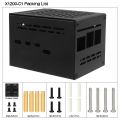 X1200-C1 Accessories
 -
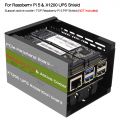 X1200-C1 Application
 -
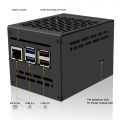 Interface-Front
 -
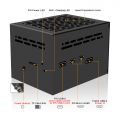 Interface-Rear
 -
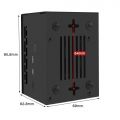 X1200-C1 Dimension


FAQ
Q1: Why does the message "This power supply is not capable of supplying 5A" appear??
X120X series UPS shield can provide enough 5A power supply capacity;
Please set as follows:
Open the Teminal window based on Raspberry Pi OS and execute the following command:
sudo rpi-eeprom-config -e
Add PSU_MAX_CURRENT=5000 at the end of the file that reads like this:

Press Ctrl-O, then enter, to write the change to the file.
Press Ctrl-X to exit nano (the editor).
Reboot your Raspberry Pi 5 to make the change take effect.
Note: If you are using other OS like Ubuntu, please flash Raspberry Pi OS first, and then re-flash other OS such as Ubuntu etc after completing the above settings.
If you are using USB peripherals that need to be powered from the RPi5's USB port, don't forget to enable the following settings to ensure that the RPi5's USB port's current output is not limited:
Add usb_max_current_enable=1 in the /boot/firmware/config.txt file.
Q2. Why am I seeing an "Undervoltage Detected" warning?
A:Regarding the low voltage warning issue(Please refer to Q1 to check whether the connection is installed correctly):
- Please carefully check whether your hardware installation is secure and if the pogo pins are making proper contact. We have had cases where customers found that loose brass standoffs caused poor contact with the pogo pins, leading to the low voltage warning.
- It may be caused by an OS update. Please confirm whether you have recently updated the OS or if your OS system updates automatically.
- Please run the command:
vcgencmd pmic_read_adcand provide us with the result. Alternatively, use a multimeter to measure the voltage value of PIN2. As shown in the figure

pi@geekworm:~ $ vcgencmd pmic_read_adc
 3V7_WL_SW_A current(0)=0.00097593A
   3V3_SYS_A current(1)=0.13955800A
   1V8_SYS_A current(2)=0.25374180A
  DDR_VDD2_A current(3)=0.01854267A
  DDR_VDDQ_A current(4)=0.00049020A
   1V1_SYS_A current(5)=0.25276590A
    0V8_SW_A current(6)=0.34547920A
  VDD_CORE_A current(7)=0.87514000A
   3V3_DAC_A current(17)=0.00024420A
   3V3_ADC_A current(18)=0.00024420A
   0V8_AON_A current(16)=0.00341880A
      HDMI_A current(22)=0.02063490A
 3V7_WL_SW_V volt(8)=3.70534400V
   3V3_SYS_V volt(9)=3.31467300V
   1V8_SYS_V volt(10)=1.80024200V
  DDR_VDD2_V volt(11)=1.11355200V
  DDR_VDDQ_V volt(12)=0.60109830V
   1V1_SYS_V volt(13)=1.10622600V
    0V8_SW_V volt(14)=0.80109810V
  VDD_CORE_V volt(15)=0.72017020V
   3V3_DAC_V volt(20)=3.31318300V
   3V3_ADC_V volt(21)=3.31684600V
   0V8_AON_V volt(19)=0.80029220V
      HDMI_V volt(23)=5.19920000V
     EXT5V_V volt(24)=5.20322000V
      BATT_V volt(25)=0.00000000V
Please check the voltage value of EXT5V_V line
Q3. How to disable/enable the 5V output of the UPS when the RPi 5 is turned off?
A: Editing the EEPROM configuration
From the command line or Terminal window start by running the following command :
sudo rpi-eeprom-config -e
Set POWER_OFF_ON_HALT to 0 or 1 like this:
1: disable 5v outputs
0: enable 5v outputs
Press Ctrl-O, then enter, to write the change to the file.
Press Ctrl-X to exit nano (the editor).
Reboot your Raspberry Pi 5 to make the change take effect.
Q4: How to disable auto power on feature on X1200?
A: When you connect an external power supply, the UPS board will automatically power on the Pi 5 motherboard while it starts charging, this feature is called auto power on, considering that some customers need to disable this feature, so we have also disclosed the following solution to disable it: please use a soldering iron to remove the resistor indicated by the arrow in the illustration.

PS: We don't think you need to remove the resistor to disable 'AUTO ON' function. Since there is an onboard switch, if you don't want AUTO ON, just press the switch to completely cut off the power.
WARNING: Please consider the following risks before removing this resistor:
- Do not operate if you are not a professional user
- The removal operation may damage the MCU, so please be careful with the operation.
- Once you remove this resistor by yourself, you will lose the warranty of this product. We no longer offer any warranty for this product.
- Once you remove this resistor, you can only turn on the power output by pressing the on-board switch.
Q5: How to disable auto power on feature on X1201?
A: When you connect an external power supply, the UPS board will automatically power on the Pi 5 motherboard while it starts charging, this feature is called auto power on, considering that some customers need to disable this feature, so we have also disclosed the following solution to disable it: please use a soldering iron to remove the resistor indicated by the arrow in the illustration.

PS: We don't think you need to remove the resistor to disable 'AUTO ON' function. Since there is an onboard switch, if you don't want AUTO ON, just press the switch to completely cut off the power.
WARNING: Please consider the following risks before removing this resistor:
- Do not operate if you are not a professional user
- The removal operation may damage the MCU, so please be careful with the operation.
- Once you remove this resistor by yourself, you will lose the warranty of this product. We no longer offer any warranty for this product.
- Once you remove this resistor, you can only turn on the power output by pressing the on-board switch.
Q6: How to disable auto power on feature on X1202?
A: When you connect an external power supply, the UPS board will automatically power on the Pi 5 motherboard while it starts charging, this feature is called auto power on, considering that some customers need to disable this feature, so we have also disclosed the following solution to disable it: please use a soldering iron to remove the resistor indicated by the arrow in the illustration.

PS: We don't think you need to remove the resistor to disable 'AUTO ON' function. Since there is an onboard switch, if you don't want AUTO ON, just press the switch to completely cut off the power.
WARNING: Please consider the following risks before removing this resistor:
- Do not operate if you are not a professional user
- The removal operation may damage the MCU, so please be careful with the operation.
- Once you remove this resistor by yourself, you will lose the warranty of this product. We no longer offer any warranty for this product.
- Once you remove this resistor, you can only turn on the power output by pressing the on-board switch or external power switch.
Q7: How to disable auto power on feature on X1203?
A: When you connect an external power supply, the UPS board will automatically power on the Pi 5 motherboard while it starts charging, this feature is called auto power on, considering that some customers need to disable this feature, so we have also disclosed the following solution to disable it: please use a soldering iron to remove the resistor indicated by the arrow in the illustration.

PS: We don't think you need to remove the resistor to disable 'AUTO ON' function. Since there is an onboard switch, if you don't want AUTO ON, just press the switch to completely cut off the power.
WARNING: Please consider the following risks before removing this resistor:
- Do not operate if you are not a professional user
- The removal operation may damage the MCU, so please be careful with the operation.
- Once you remove this resistor by yourself, you will lose the warranty of this product. We no longer offer any warranty for this product.
- Once you remove this resistor, you can only turn on the power output by pressing the on-board switch or external power switch.
Q8: Why is the RPi5 LED still on and red after the UPS is turned off?
A: Please set as follows:
Open the Teminal window based on Raspberry Pi OS and execute the following command:
sudo rpi-eeprom-config -e
Change the setting of POWER_OFF_ON_HALT from 0 to 1
Press Ctrl-O, then enter, to write the change to the file.
Press Ctrl-X to exit nano (the editor).
Reboot your Raspberry Pi 5 to make the change take effect.
Q9: What battery is recommended for this UPS shield?
A: Please use high quality batteries from Samsung 35E 18650 lithium battery, Panasonic NCR18650B, Toshiba, etc. Do not use the battery with built-in protection circuit because it will limit the discharge current.
For the X1203 shield:
If using a lithium battery, the required voltage is 3.7V;
If using a battery pack or battery holder, please make sure it is a parallel battery pack. Please use a high-quality battery holder with thick and durable connection cables. Using a low-quality battery holder with thin or poorly connected wires may cause the X1203 to malfunction or fail to operate as expected.
There are 2 XH2.54-2P battery connectors on board, it is recommended to use the same type of battery.

Q10: Run sudo i2cdetect -y 1, can't find I2C address 0x36?
A:
1. Make sure you enable i2c interface, refer to How to enable I2C
2. The UPS connects to the Pi GPIO via pogo pins, If the I2C address (0x36) is not detected, Please clear the leads of pin 3 and pin 5 on the GPIO header from the bottom of the Raspberry Pi PCB and install again, and also check if the pogo pin of ups shield is in close contact with the pad position of PI 5(you can adjust the [pogo pin] position).

There won't be any other problems, it's this poor contact that's causing it.

Q11. How do you disable the X1202 auto-shutdown when you use it standalone (not installed on a RPi5)?
A:

Q12. X1203 UPS voltage drops / low voltage warning appears?
A:
1.Powering the X1203 via Type C connector with / without the batteries,Pls check if you still have the issue.
2.Please clear the test pad on the Pi's PCB bottom which is used for connecting the X1203 for 5V power delivery.

Q13. Documentation about the I2C registers:
A:
Q14. Why does the RPI 5 lose power within a few seconds after pressing the power button on the X120x UPS?
A:
Please note: If the UPS does not detect the RPi5, it will automatically shut down within 3 seconds. So you need to install the RPi 5 on the UPS and make sure that the RPi5 has good contact with the UPS's pogo pins.
Q15. Which product should I choose if I can’t connect to a Raspberry Pi via pogo pins?
A:
For the X12-UPS series, we recommend the X1206 – models from X1200 to X1205 do not support this usage. The X120- UPS series auto-powers off when no Raspberry Pi 5 is detected, while the X1206 can be set to "Always Power On" mode and keeps working even if the Raspberry Pi is shut down. Please refer to Interface ⑩_ALON in the picture.

You can also consider the X-UPS1. It features a GPIO Pin-Connected standalone design with high flexibility for installation and adaptation (refer to the picture).

Q16. Questions about reverse-polarity protection
Q. Does the X1200 series have reverse-polarity protection? What happens if I insert a single cell backward?
A: Yes. The X1200 series features hardware-level reverse-polarity protection circuitry. If only one 18650/21700 cell is installed and it is inserted backward, the board will immediately enter a protection state and disable all functionality. This blocks reverse current from reaching or damaging the downstream charging and system circuits.
Q.What happens if one cell is inserted correctly and the other is reversed for X1200?
A: The board is safely protected by dedicated inline fuses. Each individual battery slot on the X1200 is integrated with its own 5A rated fuse. If a user inserts one cell correctly and the second cell backward, the massive loop current generated between the two cells will instantly blow the 5A fuse of the reversed slot. This isolates the faulted battery holder and completely protects the rest of the board and the correctly installed cell from damage.
⚠️ Warning: Despite these robust hardware safeguards, always ensure the correct polarity when installing batteries. Relying on protection states should be a last resort.
Q: What are the exact over-current and short-circuit protection thresholds for X1200?
A: The X1200 utilizes a two-tier protection architecture to handle short-circuits and over-current conditions:
- Slot Level: Each 18650 battery holder is inline with a bidirectional 5A fuse that blows immediately if individual slot current exceeds 5A.
- System Level: After the two slots parallel together, the power rail passes through a dedicated battery protection IC. The hardware over-current trip threshold for this IC is 10.5A to 19.5A.
Q17. Conflict on shared GPIO16 between MAX98357A I2S amplifier and X1203 triggers RPi5 reset when audio plays, what to do?
A:
Grateful for the commenter's valuable insights; below is his fix:
Cause: The dtoverlay=googlevoicehat-soundcard (or googlevoicehat) device tree overlay, During audio playback, it drives GPIO16, which is used as the amplifier enable (shutdown) pin. Unfortunately, GPIO16 is also used by the X1203 UPS, and toggling this pin causes the UPS to interpret it as a control signal, resulting in an immediate system reboot.
Solution: I modified the Device Tree Source (.dts) for the overlay, changing the amplifier enable GPIO from GPIO16 to another unused GPIO. After recompiling the overlay (.dtbo) and replacing the original file in /boot/firmware/overlays/ (or /boot/overlays/, depending on the Raspberry Pi OS version), the problem was completely resolve