-
X1500: Difference between revisions
| Line 90: | Line 90: | ||
'''Installation Sequence Tips: | '''Installation Sequence Tips: | ||
''' | ''' | ||
Please follow screw torque order when install C519 with CM5 and X1500/X1501. | * Please follow screw torque order when install C519 with CM5 and X1500/X1501. | ||
1. Pre-thread the screws into their holes but not past the CM5 PCB's surface. | * 1. Pre-thread the screws into their holes but not past the CM5 PCB's surface. | ||
2. Align the C519 carefully with the mounting holes, maintaining near-zero clearance during assembly. | * 2. Align the C519 carefully with the mounting holes, maintaining near-zero clearance during assembly. | ||
3. Press down firmly on the C519 until the heatsink touches the PCB, then tighten the screw. | * 3. Press down firmly on the C519 until the heatsink touches the PCB, then tighten the screw. | ||
[[File: X1500-IMG-9252-Installtion.jpg|900px]] | [[File: X1500-IMG-9252-Installtion.jpg|900px]] | ||
Revision as of 11:47, 25 June 2025


Overview
The X1500 is a purpose-built IO board tailored for the Raspberry Pi Compute Module 5 (CM5). It features two full-size M.2 NVMe slots and integrates a variety of peripherals into an ultra-compact design. This carrier board is meticulously engineered to streamline system development, allowing you to rapidly assemble solutions using readily available off-the-shelf components, such as existing Raspberry Pi HATs and M.2 NVMe devices.
For ease of integration, the board features a streamlined layout with major user connectors positioned along one edge, making enclosure design straightforward and efficient. Whether you're developing with the Compute Module 5 or deploying it as part of an embedded end product, the X1500 is designed to meet your needs with flexibility and performance.
The difference between X1500, X1501, X1502 and X1507
| Features | X1500 | X1501 | X1502 | X1507 |
|---|---|---|---|---|
| Compatible with | Raspberry Pi CM5 | Raspberry Pi CM5 | Raspberry Pi CM5 | Raspberry Pi CM5 |
| Ethernet Port | 1GbE Ethernet Port x 1 | 1GbE Ethernet Port x 1, 2.5GbE Ethernet Port x 1 |
1GbE Ethernet Port x 1, 2.5GbE Ethernet Port x 1 |
1GbE Ethernet Port x 1 |
| USB-C Power In Port | ✔ | ✔ | ✔ | ✔ |
| USB-A Ports | 2 x USB2.0 Type-A, 2 x USB3.0 Type-A |
1 x USB2.0 Type-A, 1 x USB3.0 Type-A |
1 x USB2.0 Type-A, 1 x USB3.0 Type-A |
2 x USB2.0 Type-A, 2 x USB3.0 Type-A |
| HDMI 2.0 Ports | 2 x HDMI 2.0 | 2 x HDMI 2.0 | 2 x HDMI 2.0 | 2 x HDMI 2.0 |
| M.2 NVMe Key-M Slot | Dual 2230/2242/2260/2280 |
Dual 2230/2242/2260/2280 |
Four 2230/2242/2260/2280 |
Dual 2230/2242 |
| Dual MIPI DSI/CSI-2 Connectors | ✔ | ✔ | ✔ | ✔ |
| MicroSD Card Slot | ✔ | ✔ | ✔ | ✔ |
| Power Button | ✔ | ✔ | ✔ | ✔ |
| RTC Battery Socket | ✔ Require CR1220 | ✔ Require CR1220 | ✔ Require CR2032 | ✔ with a RTC Battery Connector, Require CR1220 and battery holder |
| 4Pin PWM Fan Port | ✔ | ✔ | ✔ | ✔ |
| Support Hailo-8 AI Accelerator | ✔ | ✔ | ❌ | ✔ |
| PoE header | ✔ | ✔ | ❌ | ✔ |
| 40pin GPIO header | ✔ | ✔ | ✔ | ✔ |
| 12pin Configurable header J2 | ✔ | ✔ | ✔ | ✔ |
| Jumper setting for CAM/DISP1 J6 | ✔ | ✔ | ✔ | ✔ |
| PoE HAT support | X15-POE1 | X15-POE1 | Currently no compatible PoE HAT | Currently no compatible PoE HAT Can work with X1012 POE HAT to achieve POE function, but the NVME function of the X1012 is no longer available |
| Matching Case | X1500-C1 / X15-C1 | X1500-C1 / X15-C1 | X1502-C1 | X1507-C1 TBD.If a casing is produced, it will be notified here. |
| Matching Cooler | C519 | C519 | C519 | Equipped with a passive cooler |
| Matching Power Adapter | XS-GaN-27W / XSL-GaN-27W / HT-PD27W |
XS-GaN-27W / XSL-GaN-27W / HT-PD27W |
PSU60 / PSU12V10A | XS-GaN-27W / XSL-GaN-27W / HT-PD27W |
Features
| For use with |
Raspberry Pi Compute Module 5 (CM5) |
| Key Features |
CAM/DISP 0 supports both displays or cameras. CAM/DISP 0 supports using a signal to power down the camera to save power. CAM/DISP 1 typically needs two jumpers fitting to J6 to route the I2C signals form the GPIO connector to the camera connector. CAM/DISP 1 can be be used with displays and cameras. If it is used with a camera, it isn’t possible to power down the camera. Also refer to Raspberry Pi Compute Module 5 IO Board datasheet (Page 5)
|
| Technical Specification |
Power supply:
|
| Important Notes |
For optimal performance, please use the official Raspberry Pi 27W USB-C Power Supply or an alternative power supply capable of delivering 5.1V at 5A. An incompatible power supply with a lower output voltage may fail to power on the system. |
Packing List
CM5 carrier board Kit
- X1500 V1.0 CM5 carrier board x 1
- M.2-A1 extension board x 2 (to fix M.2 2230 and 2242 SSDs)
- 2.54mm jumer cap x 2
- M2*3 screw x 6

User Manual
- Hardware Installation: X1500 Hardware, please click the left link to view it, and it's very important!
- How to make it work: X1500 Software, please click the left link to view it, and it's very important!
- https://smarthomecircle.com/how-to-install-os-on-raspberry-pi-compute-module-5-emmc-storage
- how to flash os into cm5 emmc, Refer to the following:
- https://smarthomecircle.com/how-to-install-os-on-raspberry-pi-compute-module-5-emmc-storage
- https://www.youtube.com/watch?v=SWv-WYlHJWQ
Installation Sequence Tips:
- Please follow screw torque order when install C519 with CM5 and X1500/X1501.
- 1. Pre-thread the screws into their holes but not past the CM5 PCB's surface.
- 2. Align the C519 carefully with the mounting holes, maintaining near-zero clearance during assembly.
- 3. Press down firmly on the C519 until the heatsink touches the PCB, then tighten the screw.


Video Guide
Installation Video: https://youtu.be/H1vgT2lrJQI
Matching Case
X1500-C1 case is designed for the raspberry pi CM5 & X1500/X1501 IO Board only, compatible with C519 heatsink.
- Case dimensions: 110 x 90 x 33 mm / 4.33 x 3.54 x 1.30 inches
-
 X1500-C1 packing list
 -
X500-C1
-
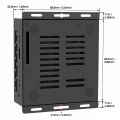 X1500-C1 Size


FAQ
Q. Why can't X1500/X1501 boot up?
A: First, please confirm that your Raspberry Pi CM5 module is working properly. You can refer to online guides for instructions on how to verify that the CM5 is functioning correctly.
Due to PD power compatibility issues, some PD power supplies may cause X1500/X1501 to fail to boot up. Please replace the official Raspberry Pi 5 power supply or Geekworm PSU20 power supply.
Q: Is X1500/X1501 compatible with POE+ Hat?
A: X1500/X1501 is compatible with X15-POE1.
We tested the [Official Raspberry Pi4 POE+ Hat] and it can be compatible, but the cooling fan did not work, probably due to the OS configuration. If you are interested, you can also test it and look forward to your sharing of your suggestions.


Q: Is the X1501 2.5G ethernet port on the PICe bus along with the M.2 devices?
A: No, the X1501 2.5G Ethernet port is connected via the USB 3.0 interface.
Q: How to configure for an external antenna?
A: When using an external antenna, you need to configure the device accordingly. Please follow the official Raspberry Pi documentation for the configuration steps: https://www.raspberrypi.com/documentation/computers/compute-module.html#antenna

Q: What driver do I need for the X1501 2.5GbE Ethernet on OpenWrt?
A: No additional driver is required. Once the X1501 is installed on the CM5, it works just like a Raspberry Pi 5, and the 2.5GbE Ethernet can be used directly under OpenWrt.
Q. Is X1500/X1501 compatible with X1209 UPS?
A: Yes, the X1500/X1501 is compatible with the X1209 UPS. However, the power button on the X1209 only supports press-to-power-on and triple-press for a forced shutdown. Based on customer testing, the clearance between the bottom of the X1209 board and the top surface of the mounted CM5 is approximately 9.45mm (excluding the height of the processor and other chips). Due to this limited space, the C519 heatsink is not compatible with this configuration.At present, there is no suitable heatsink solution available for this specific setup.

<comments />