-
X1207: Difference between revisions
| (44 intermediate revisions by 7 users not shown) | |||
| Line 1: | Line 1: | ||
{{GD Template Impl}} | {{GD Template Impl}} | ||
[[File:X1207-IMG-9926-Interface-1.jpg|thumb|right|X1207 V1.2 Interface Schematic]] | [[File:X1207-IMG-9926-Interface-1.jpg|thumb|right|X1207 V1.2 Interface Schematic]] | ||
[[File:X1207-IMG-0073.jpg|thumb|right|X1207 V1.2]] | |||
[[File:X1207-IMG-0101-pogo-pin-connection.jpg|thumb|right|X1207 V1.2 with Raspberry Pi 5]] | |||
[[File:X1207-IMG-0105-Power.jpg|thumb|right|X1207 V1.2 with Raspberry Pi 5]] | |||
[[File:X1207-IMG-0077.jpg|thumb|right|X1207 V1.2 with Raspberry Pi 5]] | |||
[[File:X1207-IMG-0099.jpg|thumb|right|X1207 V1.2 with Raspberry Pi 5]] | |||
==Safety Instructions & Warnings== | ==Safety Instructions & Warnings== | ||
{{UPS Safety Warning}} | |||
==Overview== | ==Overview== | ||
| Line 71: | Line 59: | ||
* [[X1002]] single NVMe shield for Pi5 | * [[X1002]] single NVMe shield for Pi5 | ||
* [[X1005]] dual NVMe shield for Pi5 | * [[X1005]] dual NVMe shield for Pi5 | ||
|- | |- | ||
| '''Notes''' || | | '''Notes''' || | ||
| Line 111: | Line 95: | ||
==User Manual== | ==User Manual== | ||
* '''Hardware Installation: [https://suptronics.com/Raspberrypi/Power_mgmt/x1207-v1.2_hardware.html X1207 Hardware]''', <span class="tb_red"> You can view the '''Raspberry Pi GPIO used''' and '''Dimensions''' here </span> | * '''Hardware Installation: [https://suptronics.com/Raspberrypi/Power_mgmt/x1207-v1.2_hardware.html X1207 Hardware]''', <span class="tb_red"> You can view the '''Raspberry Pi GPIO used''' and '''Dimensions''' here </span> | ||
* '''How to make it work: [ | * '''How to make it work: [[#Script Reference]]''' | ||
==Packing List== | ==Packing List== | ||
| Line 120: | Line 104: | ||
[[File:X1207-IMG-0015-Packing-List.jpg|600px]] | [[File:X1207-IMG-0015-Packing-List.jpg|600px]] | ||
==Script Reference== | |||
{{X120x Series UPS Script Reference}} | |||
==Installation Guide== | |||
*Installation of X1207 and [[X1207-C1]] | |||
:[[File:X1207-X1207-C1-Install-guide.jpg|800px]] | |||
Installation Video for Raspberry Pi 5+[[X1207]]+[[X1207-C1]]: https://youtu.be/Xorg8pj33yM | |||
{{#ev:youtube|https://youtu.be/Xorg8pj33yM}} | |||
==Matching Case== | ==Matching Case== | ||
The [[X1207-C1]] is a premium metal case specially designed for the Raspberry Pi 5 X1207/'''[[X1208]]''' UPS Shield, offering robust protection in a sleek, black aesthetic. | |||
* Case dimension: 92.8 x 90.8 x 42.8 mm | |||
<gallery> | |||
X1207-C1-IMG-0165-Packing List.jpg|X1207-C1 Accessories | |||
X1207-C1-IMG-0167.jpg|X1207-C1 | |||
X1207-C1-IMG-0170.jpg|X1207-C1 | |||
X1207-C1-IMG-0174.jpg|X1207-C1 | |||
X1207-C1-IMG-0186-X1207-X1002.jpg|X1207-C1 | |||
X1207-C1-IMG-0200-size.jpg|X1207-C1 | |||
</gallery> | |||
==FAQ== | ==FAQ== | ||
<div class="toccolours mw-collapsible mw-collapsed"> | |||
<div class="toccolours mw-collapsible mw-collapsed"> | |||
<div style="font-weight:bold;line-height:1.0;"> | <div style="font-weight:bold;line-height:1.0;"> | ||
Q: Can I install the [https://www.raspberrypi.com/products/ai-hat/ official Raspberry Pi AI HAT] in the X1207-C1 case? | |||
</div> | </div> | ||
<div class="mw-collapsible-content"> | <div class="mw-collapsible-content"> | ||
A: | A: No. The X1207-C1 case has only 10mm of top clearance above the [[X1207]], whereas the official AI HAT requires 16mm. Therefore, stacking any HAT above the X1207 is '''not supported'''. | ||
As an alternative, you may consider installing the [[X1005]] underneath the Raspberry Pi 5 inside the X1207-C1 case. The [[X1005]] supports the Hailo-8 AI Accelerator and is compatible with the X1207-C1 enclosure. | |||
</div> | </div> | ||
</div> | </div> | ||
<!--Add review function! --> | <!--Add review function! --> | ||
< | <comment-streams id="main" /> | ||
<!--Please choose the --> | <!--Please choose the --> | ||
Latest revision as of 10:58, 12 June 2026


Safety Instructions & Warnings
- The power adapter must with overvoltage and surge voltage protection; otherwise, it may easily damage the circuit board. Damage caused by a substandard power supply will not be covered under warranty.
- It is essential to read and understand these safety instructions and warnings before charging your batteries.
- Lithium Polymer and Li-ion batteries are volatile. Failure to read and follow the instructions below may result in fire, personal injury, and damage to property if charged or used improperly.
- Never make a wrong polarity connection when charging or discharging battery packs. Always double-check the polarity of the battery's connector to ensure that "+" is connected to "+" and "-" is connected to "-".
- Do not mix and use old batteries with new batteries, or batteries with different brand names.
- Lithium batteries have a limited cycle life. Please replace old batteries with new ones when they reach their service life or when they are two years old, whichever comes first.
- When charging the Battery Pack, please place the battery in a fireproof container. Do not leave the UPS shield on wood material or carpet unattended.
- Keep the UPS shield away from children to ensure their safety.
- Ensure your fingers do not touch the solder pads when inserting the battery into the battery holder, as this could cause a short circuit. This is extremely important!!!
- Make sure to insert the battery before turning on the UPS.
- Make sure to insert the battery before connecting the external charger to charge it.
- Please watch Main Video and Tutorial Video regarding 18650 batteries at: https://www.staysafebattery.com/en/
- Battery Recommend for Geekworm UPS board, please refer to: File:NCR18650B.pdf
Overview
The X1207 is a PoE-powered UPS HAT designed for Raspberry Pi 5, delivering reliable 5.1V/5A backup power to maintain uninterrupted operation. It supports high-demand setups and complies with IEEE 802.3af/at PoE standards, drawing up to 25W from a compatible POE switch while providing both power and network connectivity over a single cable.
With intelligent power management, it monitors Pi status, cuts power after shutdown to conserve battery, and features ultra-low standby consumption. The board ensures seamless power switching during outages and supports auto power-on and AC loss detection.
▼ Expand 📋 Geekworm Raspberry Pi 5 UPS Family:
- *The Matching Case section only indicates compatibility between the case, UPS and Raspberry Pi 5 Board, and excludes products in the Product Matching Reference section. Compatibility of these referenced products with the case is subject to their actual specifications.
- *In addition to voltage and current, ensure that the total power of the power supply meets or exceeds the recommended input power (Total Power = Voltage × Current).
| Model | Compatible with | Mounting Position | Lithium battery type | Battery Holders | Power Input Connector | Power Output Connector | Matching Case | Product Matching Reference | Note |
|---|---|---|---|---|---|---|---|---|---|
| X1200 | Raspberry Pi 5 | Bottom | 3.7V 18650 Battery | 2-Cell |
|
5Vdc Power Output XH2.54-2P x2 | X1200-C1 |
|
- |
| X1201 | Raspberry Pi 5 | Bottom | 3.7V 18650 Battery | 2-Cell |
|
5Vdc Power Output XH2.54-2P x3 | X1201-C1 |
|
Ultra-thin |
| X1202 | Raspberry Pi 5 | Bottom | 3.7V 18650 Battery | 4-Cell |
|
5Vdc Power Output XH2.54-2P x2 | X1202-C1 |
|
- |
| X1203 | Raspberry Pi 5 | Bottom | 3.7V Lithium Battery | No battery holder(recommended to use with X12-A1) |
|
5Vdc Power Output XH2.54-2P x2 | - |
|
- |
| *X1205 | Raspberry Pi 5 | Bottom | 3.7V 21700 Battery | 2-Cell |
|
5Vdc Power Output XH2.54-2P x2 | X1205-C1 |
|
- |
| *X1206 | Raspberry Pi 5 | Bottom | 3.7V 21700 Battery | 4-Cell |
V2.0 Version
V1.1 Version
|
5Vdc Power Output XH2.54-2P x2 | X1206-C1 |
X1206 V2.0 Version: Geekworm 12 V / 5 A Power Adapter / PSU12V10A
|
- |
| *X1207 | Raspberry Pi 5 | Top | 3.7V 21700 Battery | 1-Cell |
|
- | X1207-C1 |
|
Support PoE-Powered |
| *X1208 | Raspberry Pi 5 | Top | 3.7V 21700 Battery | 1-Cell |
|
- | X1207-C1 | - | Support M.2 NVMe SSD 2230/2242/2280 |
| *X1209 | RPi 5B/4B/3B/3B+ | Top | 3.7V Lithium Battery | No battery holder(recommended to use with X12-A1) |
|
5V Power Output XH2.54-2P x2 | - |
|
- |
| *X728 | All RPi that use a 40-pin header | Top | 3.7V 18650 Battery | 2-Cell |
|
5V Power Output
|
- |
|
- |
| *X-UPS1 | All RPi & Most Single Board Computers (SBC) that uses 12Vdc or 5Vdc | Standalone | 3.7V 18650 Battery | 4-Cell |
|
|
- |
|
- |
Features
| For use with | Raspberry Pi 5 Model B |
| UPS Output |
|
| Battery Charging |
|
| Power Input |
|
| Enhanced Power Management |
|
| Compatible Accessories | |
| Notes |
|
Technical specification
| Power input |
|
| UPS output |
|
| Battery charging current |
|
| Terminal Battery Voltage |
|
| Battery Recharge Threshold |
|
| Ports & Connectors |
|
| PCB Size |
|
User Manual
- Hardware Installation: X1207 Hardware, You can view the Raspberry Pi GPIO used and Dimensions here
- How to make it work: #Script Reference
Packing List
- X1207 V1.2 UPS board x 1
- Spacer M2.5 F/F 13.5mm x 4
- Screw M2.5x5mm x 8
- Pogo pin x 1 (For connecting to the Pi 5 PSW through hole)

Script Reference
This section includes two types of script resources for debugging and adapting X120x series UPS HATs. Official scripts are factory-adapted basic versions, while open-source projects are for extended reference only. All scripts must undergo prototype testing before formal use to avoid compatibility risks.
Note: The content below is a brief summary only. Click the corresponding link for detailed script examples.
Official Scripts (Click Here)
- Edit EEPROM Configuration
- Configure I2C on Raspberry Pi
- Read UPS Status
- Manually Check Battery Voltage & Percentage
- Test AC Power Loss Detection
- Control Battery Charging (For Advanced Users Only)
Third-Party Extension
- We sincerely appreciate the dedication and generous open-source contribution from the community user for these GitHub projects.
- Please note: these are independent third-party resources, not developed, verified, or maintained by our official team. We share these links for reference only; please independently verify its compatibility with your specific device, system environment, and actual needs.
- Extension 1(Click Here)
- This repository hosts a community-developed x120x-dkms kernel driver for Raspberry Pi, designed for X120x series UPS HATs, with tentative experimental compatibility for X728, X729 and X708 models. It enables basic native Linux power supply integration (including simple battery status display, low-power shutdown, and optional battery longevity mode) with no extra custom scripts required.
- Extension 2(Click Here)
- This project supports intelligent automatic shutdown, battery overcharge protection, low-temperature delayed charging, systemd journal logging, JSON UPS status output, network-based real-time UPS status update, system service & manual running modes, battery temperature monitoring and automatic thermal cooling.
Installation Guide
- Installation of X1207 and X1207-C1

Installation Video for Raspberry Pi 5+X1207+X1207-C1: https://youtu.be/Xorg8pj33yM
Matching Case
The X1207-C1 is a premium metal case specially designed for the Raspberry Pi 5 X1207/X1208 UPS Shield, offering robust protection in a sleek, black aesthetic.
- Case dimension: 92.8 x 90.8 x 42.8 mm
-
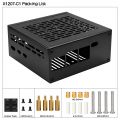 X1207-C1 Accessories
 -
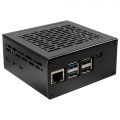 X1207-C1
 -
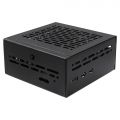 X1207-C1
 -
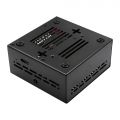 X1207-C1
 -
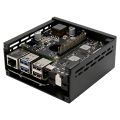 X1207-C1
 -
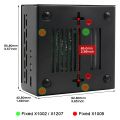 X1207-C1


FAQ
Q: Can I install the official Raspberry Pi AI HAT in the X1207-C1 case?
A: No. The X1207-C1 case has only 10mm of top clearance above the X1207, whereas the official AI HAT requires 16mm. Therefore, stacking any HAT above the X1207 is not supported.
As an alternative, you may consider installing the X1005 underneath the Raspberry Pi 5 inside the X1207-C1 case. The X1005 supports the Hailo-8 AI Accelerator and is compatible with the X1207-C1 enclosure.