X-UPS1


Contents
Safety Instructions & Warnings
- It is essential to read and understand these safety instructions and warnings before charging your batteries.
- Lithium Polymer and Li-ion batteries are volatile. Failure to read and follow the instructions below may result in fire, personal injury, and damage to property if charged or used improperly.
- Never make a wrong polarity connection when charging or discharging battery packs. Always double-check the polarity of the battery's connector to ensure that "+" is connected to "+" and "-" is connected to "-".
- Do not mix and use old batteries with new batteries, or batteries with different brand names.
- Lithium batteries have a limited cycle life. Please replace old batteries with new ones when they reach their service life or when they are two years old, whichever comes first.
- When charging the Battery Pack, please place the battery in a fireproof container. Do not leave the UPS shield on wood material or carpet unattended.
- Keep the UPS shield away from children to ensure their safety.
- Ensure your fingers do not touch the solder pads when inserting the battery into the battery holder, as this could cause a short circuit. This is extremely important!!!
- Make sure to insert the battery before turning on the UPS.
- Make sure to insert the battery before connecting the external charger to charge it.
- Please watch Main Video and Tutorial Video regarding 18650 batteries at: https://www.staysafebattery.com/en/
- Battery Recommend for Geekworm UPS board, please refer to: File:NCR18650B.pdf
Overview
The X-UPS1 is an universal stackable uninterruptible power supply (UPS) shield for most Single-Board Computers (SBC) that uses 12Vdc or 5Vdc. The UPS ensures that in event of power interruption, a battery or any other power source will intervene without any effect on your board.
Our convenient stackable design allows you to connect several UPS modules on your boards to provide long-lasting & higher output power.
Features
| For use with |
Most Single-Board Computers (SBC) that uses 12Vdc or 5Vdc,
|
| Key Features |
Power Input
Power Output
Battery Charging
Power Control
Misc
|
| Spec |
|
| Note |
Notes for stackable application:
|
Packing List
- 1 x X-UPS1 Expansion Board
- 1 x VH3.96 to DC5525 Cable (50cm length, to 12V output)
- 1 x XH2.54 to DC5521 Cable (50cm length, to 5V output)
- 1 x 4Pin PH2.0 to dupont cable (30cm length, this is a signal & 5V Output Cable)
- 1 x Adapter DC5521 Female to Type-C Male (New added on Oct., 17th, 2024)
- 1 x GPIO Header
- 2 x Jumper link Pitch 2.54mm
- 4x Spacer F/F M2.5x10mm
- 4 x Spacer M/F M2.5x25+6mm
- 4 x Screw M2.5 x 5mm

User Manual
1. X-UPS1 V1.3 Jumper Cap & Button Switch Guidance:

2. Guide based on the Raspberry Pi 5;
If you are using the X-UPS1 with the Raspberry Pi 5, you will need to do the following configuration on the Raspberry Pi 5:
From the command line or Terminal window start by running the following command :
sudo rpi-eeprom-config -e
Change the setting of POWER_OFF_ON_HALT from 0 to 1 ,
Add PSU_MAX_CURRENT=5000 at the end of the file that reads like this:

Then reboot your Raspberry Pi 5 to make the change take effect.
sudo reboot
Application
Compatible with Most Single Board Computers (SBC) that uses 12Vdc or 5Vdc, SBC Example: Orange Pi 5 / Jetson Nano / Raspberry Pi / Tinker Board / Arduino etc.
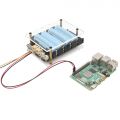
X-UPS1 for Raspberry Pi
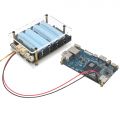
X-UPS1 for Orange Pi
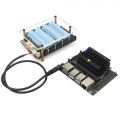
X-UPS1 for Jetson Nano


Dimension
- X-UPS1 shield dimensions source file (DXF): File:X-UPS1-PCB.dxf - You can view it with Autodesk Viewer online
- Acrylic plate: File:X-UPS1-Plate.pdf
FAQ
Q: What battery is recommended for X-UPS1 shield?
A: Please use high quality 3.7V 18650 batteries from Samsung 35E 18650 lithium battery, Panasonic NCR18650B, Toshiba, etc. Do not use the battery with built-in protection circuit because it will limit the discharge current.

Q: About X-UPS1 External PH2.0-4P Switch
A: The X-UPS1 has a JST PH2.0-4P switch connector reserved to allow you to use an external reset switch to fulfill the function of the on-board switch in appropriate scenarios. Care needs to be taken to use the correct wiring sequence for your momentary self-reset switch, please refer to the silkscreen description on the PCB board, you can refer to PSW19 or purchase it from https://geekworm.com/products/power-control-switch-for-x820-or-x735
Q: Can I use a 20V battery to power the X-UPS1?
A: Actually the DC/DC chipset can withstand 24V and we tested with a lab power supply and it worked. here is the link of the datasheet. https://www.richtek.com/assets/product_file/RT7259/DS7259-01.pdf
but to be safe, we recommend that using the 12V batteries to power the UPS boards.
Enable comment auto-refresher
Anonymous user #24
Permalink |
Anonymous user #23
Permalink |
Ruby
Anonymous user #22
Permalink |
Anonymous user #21
Permalink |
Lisa
Anonymous user #20
Permalink |
Lisa
Anonymous user #19
Permalink |
Harry
Anonymous user #22
Anonymous user #22
Anonymous user #17
Permalink |
Lisa
Anonymous user #18
Anonymous user #16
Permalink |
Anonymous user #16
Permalink |
Lisa
Harry
Anonymous user #16
Permalink |
Harry
Anonymous user #16
Permalink |
Harry
Anonymous user #14
Permalink |
Anonymous user #15
Permalink |
Lisa
Anonymous user #14
Permalink |
Harry
Anonymous user #13
Permalink |
Anonymous user #13
Permalink |
Lisa
Anonymous user #13
Permalink |
Lisa
Anonymous user #13
Permalink |
Lisa
Anonymous user #12
Permalink |
Harry
Anonymous user #11
Permalink |
Lisa
Anonymous user #10
Permalink |
Lisa
Anonymous user #9
Permalink |
Lisa
Anonymous user #8
Permalink |
Lisa
Anonymous user #7
Permalink |
Lisa
Anonymous user #6
Permalink |
Lisa
Anonymous user #5
Permalink |
Anonymous user #4
Permalink |
Walker
Anonymous user #3
Permalink |
Walker
Walker
Anonymous user #3
Permalink |
Anonymous user #2
Permalink |
Walker
Anonymous user #1
Permalink |