Overview
1. This X1509 board supports 8 SATA ports, delivering a high-speed and high-capacity storage solution for Raspberry Pi CM5. It reaches a total storage capacity of up to 176TB (22TB per single drive).
2. Designed with a compact form factor, it is equipped with multiple ports and versatile peripherals for extensive expansion.
3. Built-in high-efficiency DC/DC step-down converters provide a stable 5V 12A output. A single power supply is sufficient to power both the CM5 module and all connected SATA storage devices.
Ideal for building home media centers, personal NAS systems and CCTV video storage servers.
Features
| Compatibility |
- Fully compatible with all variants of Raspberry Pi Compute Module 5 (CM5).
- RAM: 2GB, 4GB, 8GB, 16GB
- eMMC: 0GB (Lite), 16GB, 32GB, 64GB
- Wireless: both non‑wireless and wireless (Wi‑Fi/Bluetooth) models
- Tested and supported operating systems:
- Raspberry Pi OS (64-bit)
- OpenMediaVault (OMV)
|
| 8 SATA Ports |
- Connect up to 8 SATA drives simultaneously, with a maximum total storage capacity of 176TB (22TB per drive).
- Note: Startup current reaches 16A with 8× 3.5" HDDs. DC power is not applicable; please use ATX power supply only.
- Backward compatible with SATA 6G, 3G and 1.5G hard drives. It supports data transfer rates of 5.0, 3.0 and 1.5 Gbit/s.
- Splitter Cable Included
- Comes with a power SATA splitter cable to support up to 8 drives
|
| Multiple Peripheral Ports |
Compact form factor with rich ports and expandable peripherals.
- Dual Ethernet Ports for High-Performance Networking
- Features one 1GbE Gigabit Ethernet port and one 2.5GbE port with a maximum speed of 2500Mbps.
- Supports dual 4K display output for multimedia playback and industrial applications.
- Dual MIPI DSI/CSI-2 Connectors
- 22-pin FPC connectors (0.5mm pitch), fully compatible with Raspberry Pi 5 CSI and DSI modules for seamless camera and display connection.
- Integrates general I/O ports, external power button and 12V PWM fan header, enabling DIY customization for enclosures and cooling systems.
- Works with Compute Module 5 Lite variants (models without onboard eMMC storage).
- USB-C: Dedicated for OS image loading on CM5 models with onboard eMMC.
- USB2.0 Type-A & USB3.0 Type-A: For connecting external devices such as USB flash drives, keyboards and mice.
- Used for active heat dissipation.
- Keeps the system clock accurate even when the device is powered off.
- Controls power-on and power-off for both CM5 and connected SATA devices.
|
| Built-in LED Indicators |
-
- Flashing: Data reading / writing
- Solid On: Drive connected normally
- Off: No drive detected
- Power Indicator: Red LED
- Activity Indicator: Green LED
|
| Power Supply & Control |
- Built-in High-efficiency DC/DC Step-down Converters
- Deliver stable 5V 12A output. One single power supply can power the CM5 module and all attached SATA drives simultaneously.
- Automatic Drive Power Cut-off
- Automatically cuts power to SATA devices when CM5 shuts down. This function only works with DC power input; it is not supported via the 4-pin ATX connector.
|
| Dual Power Input |
Input Voltage: 12V DC ± 5%
Warning: Over-voltage will permanently damage your hard drives!
- Recommended power supply for DC jack:
- For 8 × 2.5" SATA HDD/SSD: 12V 10A power adapter
- For 4 × 3.5" SATA HDD: 12V 10A power adapter
- Recommended power supply for 4-pin ATX connector: 12V 20A
- Warning: Only one power source shall be connected at a time.
|
| Notes |
The X1509 does not support system boot from SATA drives under the current CM5 firmware version.
|
Test & Reviews
Test Conditions
| Interface board details |
X1509 CM5 IO boards
|
| Operation system |
Raspberry Pi OS with desktop (Debian12 (bookworm), 64bit, Release date: May 6th 2025) openmediavault 7.0
|
| Storage details |
Samsung EVO 750 2.5" SATA SSD
|
| Nework details |
Xiaomi WiFi7 router BE6500 2.5G Ethernet port
|
Performance Comparison:
- 1G Ethernet vs. 2.5G Ethernet
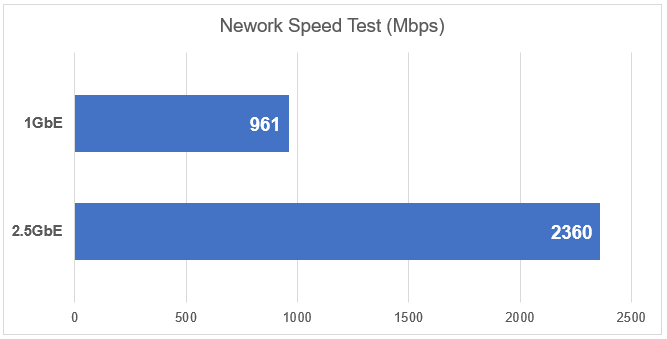
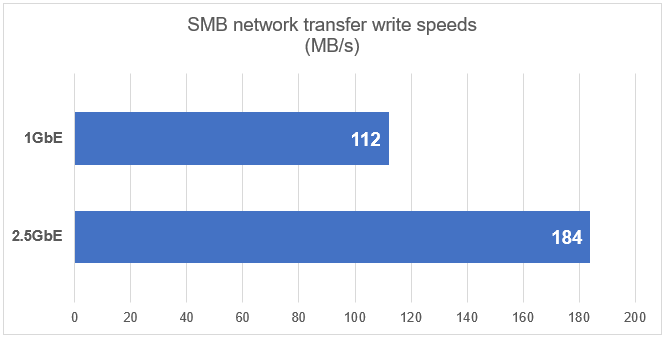
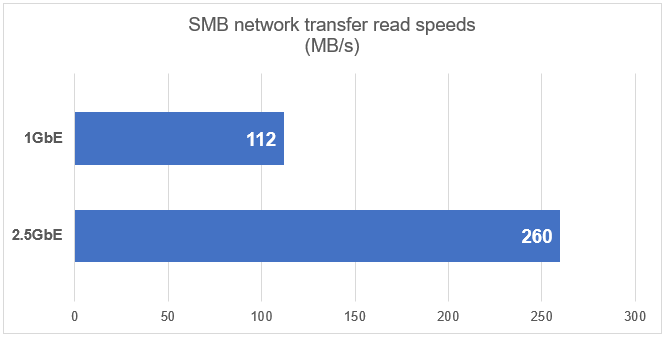
Testing 2.5Gbps Ethernet on the Raspberry Pi CM5
- Use iPerf Tool to Test Network Speed/Bandwidth, Getting max 2.36Gbps

- Performance test for write speeds on an OpenMediaVault (OMV) shared folder
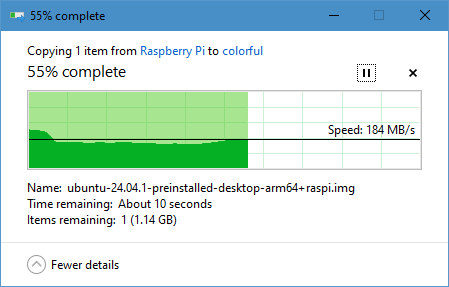
- Performance test for read speeds on an OpenMediaVault (OMV) shared folder
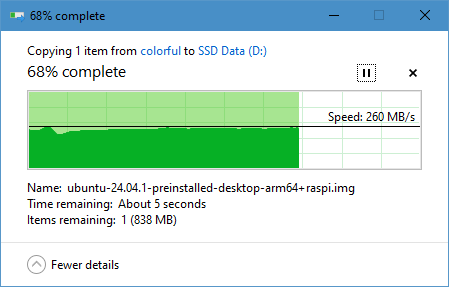
Testing 1Gbps Ethernet on the Raspberry Pi CM5
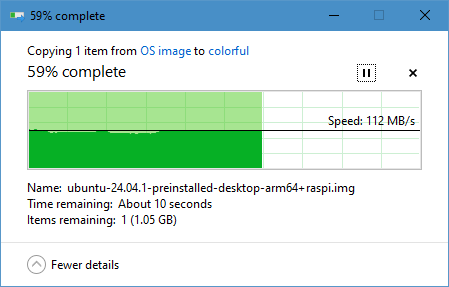
- Use iPerf Tool to Test Network Speed/Bandwidth, Getting max 961Mbps
- [File:X1509 TEST-iPerf Tool Network Speed max 961Mbps.png|700px]]
- Performance test for write speeds on an OpenMediaVault (OMV) shared folder
Packing List
User Manual
- Hardware Installation:
- How to make it work:
FAQ
A: Place the answer here.


