-
3.5 inch HDMI LCD: Difference between revisions
No edit summary |
No edit summary |
||
| Line 39: | Line 39: | ||
== Enable the Touch Function == | == Enable the Touch Function == | ||
You must install separate driver to enable touch function; Please refer to [[How to use LCD driver]] | You must install separate driver to enable touch function; Please refer to [[How to use LCD driver]] | ||
==PIN diagram == | ==PIN diagram == | ||
Revision as of 20:48, 28 April 2026


Overview
Raspberry Pi 3.5 inch HDMI Touch LCD 480x320@60fps
Features
- Resistive touch screen
- IPS wide viewing angle display
- Designed for Raspberry Pi, easy to use
- Compatible with any version of Raspberry Pi (PS: As we know, the position of HDMI port of PI zero w is different with Raspberry Pi 3 Model B, so you need to use another HDMI cable to connect the this LCD and Pi zero, for mini HDMI adapter you can refer to Raspberry pi zero base kit)
- Can be used at computer WIN7/WIN10(Touch cann't work at computer but work well at Pi)
- Driver provided ( Driver)
- Physical resolution: 320*480
- Adjustable resolution: 320x480 - 1920x1080 (Default value is be set to 800x480 resolution) ( Set the resolution)
- 60Fps high speed, support playing game and playing video;
- With OSD menu, support multi languages OSD menu, for power management, brightness/contrast adjustment, etc.
- With headphone jack
How to install

Set the resolution Base Official Raspbian
For this LCD, we can adjust the display resolution;
sudo nano /boot/config.txt
max_usb_current=1
hdmi_group=2
hdmi_mode=1
hdmi_mode=87
hdmi_cvt 800 480 60 6 0 0 0
if you want to set LCD Resolution to 1024x600, you can change hdmi_cvt 800 480 60 6 0 0 0 to hdmi_cvt 1024 600 60 6 0 0 0 Then save & exit this file;
sudo reboot
Enable the Touch Function
You must install separate driver to enable touch function; Please refer to How to use LCD driver
PIN diagram

Note
Only the touch function requires GPIO, display don't use the GPIO.

Size

Matching Acrylic Case
-
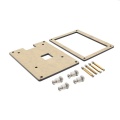 Packing List
 -
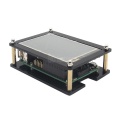 Front view
 -
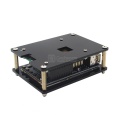 Back view


FAQ
Question 1: Does it require gpio?
Answer: Only the touchscreen requires to be connected to the GPIO pins while the display doesn't need to. However, the display needs to be powered somehow.
Question 2: Do you need to install drivers if you just want it as a monitor without touch screen? is there any configuration needed for it to work w/ RetroPie?
Answer: You needn't install extra driver if you only want it as independent monitor without touch function, but you need to connect this LCD to desktop computer via extra HDMI cable and extra Micro USB cable, the HDMI cable transfer video and audio signal, the micro USB cable supply power to LCD;
Only support 320x480 - 1920x1080 pixel range on desktop computer;
This LCD supports retropie without touch function, we need to modify the config.txt file as following:
max_usb_current=1
hdmi_group=2
hdmi_mode=1
hdmi_mode=87
hdmi_cvt 800 480 60 6 0 0 0
hdmi_drive=1
Then you can use it on retropie without touch function.
By the way, this LCD supports almost all raspberry pi OS, and you need modify the config.txt file like above.
BUT besides raspbian and ubuntu, the touch function is not supported on other OS. <comments/>