-
RuneAudio: Difference between revisions
Jump to navigation
Jump to search
Add {{Deprecated}} template |
Replace <comments/> with <comment-streams /> |
||
| (One intermediate revision by the same user not shown) | |||
| Line 22: | Line 22: | ||
[[File:Renearduino-config.jpg|400px]] | [[File:Renearduino-config.jpg|400px]] | ||
< | <comment-streams id="main" /> | ||
[[Category:Raspberry pi]] | [[Category:Raspberry pi]] | ||
[[Category:Knowledge]] | [[Category:Knowledge]] | ||
Latest revision as of 10:13, 27 May 2026
⚠️ Deprecated: This page is outdated and may contain inaccurate information. It is kept for reference only.
Introduction
RuneAduio is a free and open source software that turns embedded hardware into Hi-Fi music players.
Take an inexpensive, silent and low-consumption mini-PC and make it perform as an high fidelity digital source.
RuneAudio is same with Volumio, but it have some advantages:
- Turn speed much faster than Volumio,
- Interface is more beautiful than Volumio,and can edit album;
- More simple and convenient Network and wifi configuration;
- No restart after configure;
Some disadvantages:
- Configure option is less than Volumio;
- Less sound format file;
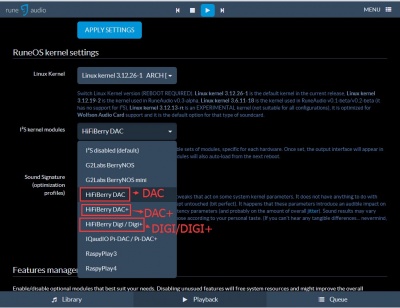
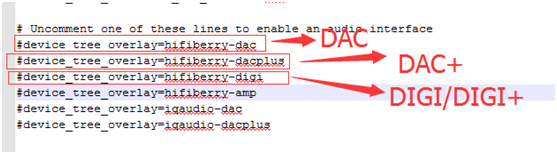
How to use DAC/DAC+/DIGI/DIGI+ on Runeaudio
- Download RuneAduio by your raspberry pi version (A+/B/B+/2B) from RuneAduio:
- Open and edit config.txt;

- Config RuneAudio by your product;